

App Store Screenshots (6)



Design Analysis
Visual Design
App Insights
About AR Ruler App: Tape Measure Cam
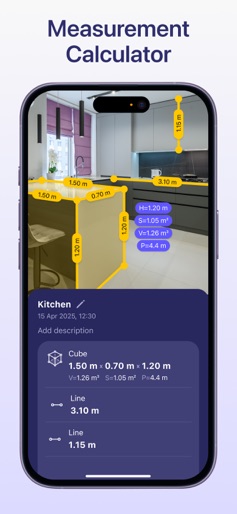
AR Ruler: Measuring tape with AR Technology The AR Ruler measurement app with measurement calculator uses advanced AR technology and your phone’s camera measuring tape system to deliver precise measurements of real-world objects. With this digital ruler, you can quickly perform a room measure, check height measure of walls, calculate length measure, and estimate distance, angles, area, volume, and more. Simply point your digital tape measure at any object using your smartphone and begin measuring instantly. The built-in 3D scanner detects surfaces and allows you to activate the AR tape measure tool with ease — making it a complete measurement calculator for both home and professional use. Key Tools Available in the AR Ruler App: Line & Height – Measure the length and height of objects quickly. Distance Meter – Measure distance from the device camera to a point on a 3D surface. Angle Tool – Measure angles directly on real surfaces. Polyline & Polyline Smooth – Calculate the total length of a drawn path. Rectangle Tool – Get length, perimeter, and area of rectangles. Circle Tool – Measure the radius, perimeter, and area of circular objects. Poly & Poly Smooth – Useful for measuring irregular shapes’ area and volume. Volume & Volume Smooth – Determine the volume of 3D structures or piles. Cube & Cylinder Tools – Fast measurement of these shapes’ dimensions. Walls & Curved Wall – Ideal for quick room measure and wall adjustments. Heap & Pit – Tools to measure the volume of material stacks or excavations. Access tools even faster via home screen widgets. Whether you're a DIY user, contractor, or interior designer, the AR Ruler app transforms your smartphone into a powerful camera measuring tape and measurement calculator. Try AR Ruler app now – we’d love to hear your feedback! Customer Support: Should you have any questions about AR Ruler app or need help, please do not hesitate to contact us via developer email: support@grymalaltd.com. Follow us: Twitter: https://twitter.com/grymalaofficial Instagram: https://www.instagram.com/grymala_official/ Pinterest: https://www.pinterest.com/grymalaapps/ LinkedIn: https://www.linkedin.com/company/grymala/ Subscription: --------------- Premium - 3 days free trial • No ads; • Unlimited number of projects; • Unlimited Access to Premium Tools. Price may vary by country. You won’t be charged if you cancel at least 24 hours before the end of trial period. Active subscription will automatically renew unless canceled at least 24 hours before the end of the current active period (year). You can manage subscriptions in your iTunes Account Settings. Subscription is charged to your credit card through your iTunes account. --- Terms of Service: https://www.apple.com/legal/internet-services/itunes/dev/stdeula/
Create screenshots like AR Ruler App: Tape Measure Cam
Use FlyerBanana's free editor to create professional App Store screenshots inspired by AR Ruler App: Tape Measure Cam's design. 100+ templates, device frames, and one-click export.
More Productivity Apps
View all

Microsoft Outlook
Productivity


AVG AntiVirus & Security
Productivity


Screen Recorder - XRecorder
Productivity


Opera: Private Web Browser
Productivity


Parallel Space - app cloning
Productivity


Duolingo - Language Lessons
Productivity