

App Store Screenshots (8)




Design Analysis
Visual Design
App Insights
About Camo Sniper
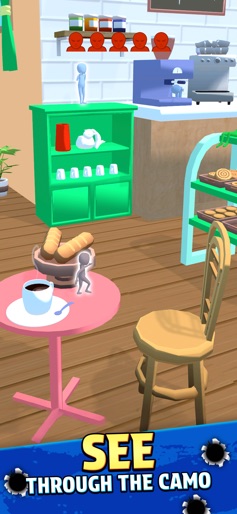
Become the ultimate Camo Sniper! Are you ready to test your eagle eye? Camo Sniper is the ultimate hypercasual shooter simulation game that challenges you to find and take out cleverly hidden, camouflaged enemies. Each level is a new puzzle, blending the thrill of a sniper game with a satisfying find and seek challenge. Step into the shoes of an elite marksman. Your mission is simple: spot the hidden targets in vibrant, low-poly environments and pull the trigger. The game is designed for quick, satisfying sessions, perfect for a short break or a quick gaming fix. Key Features: Spot the Camo: Master the art of a sniper by identifying enemies hidden in plain sight. It’s a puzzle and a shooter all in one! Hypercasual Fun: Jump right into the action with simple, one-touch controls. No complicated tutorials, just pure, addictive gameplay. Dynamic Progression: Advance through dozens of unique levels. The challenge increases as you go, pushing your spotting skills to the limit. Satisfying Simulation: Enjoy the realistic feel of aiming and firing, paired with the gratifying slow-motion effect of a successful shot. Stylized Graphics: Immerse yourself in a world of clean, sharp, and visually appealing low-poly graphics that make every target stand out—or disappear. Are you ready to prove your skills? Download Camo Sniper now for FREE and become the master of camouflage!
Create screenshots like Camo Sniper
Use FlyerBanana's free editor to create professional App Store screenshots inspired by Camo Sniper's design. 100+ templates, device frames, and one-click export.










