
iScreen - Widgets & Wallpaper
Xiamen ShenZhuo Information Technology Co., Ltd.
Create Screenshots Like iScreen - Widgets & WallpaperApp Store Screenshots (10)


Design Analysis
Visual Design
App Insights
About iScreen - Widgets & Wallpaper
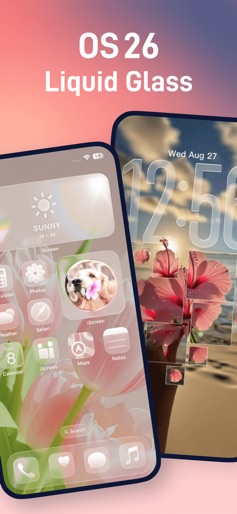
* Phone Style, iScreen it! * iScreen - personalized homescreen with various Widgets & Themes & Wallpaper to make your phone screen stand out! *iOS 26 Unlocked!, featuring liquid glass effects and over 1000+ 3D space wallpapers and themes. Added dynamic Control Center customization for a more practical and fun experience. You can not only keep pets and grow plants on the Dynamic Island, customize your Lock Screen with Interactive, Weather, Battery, Launcher, X-Panel, Text & Icon, Animation, Work Clock, Step Count widgets, but also add Home Screen widgets like Dynamic Panel, Photos, Scrolling Album, To-Do List, Countdown, Digital Clock, Calendar, Emoji Notes, Fan, Air Conditioner, and more for greater fun. Besides widgets, iScreen also offers various Themes, Wallpapers, AI-generated artwork, Charging Animations, and other features to make your phone screen more beautiful and unique. Special feature: 【iOS 26】 Fun iOS 26 Features, customized with 1000+ 3D space wallpapers and themes. Added dynamic Control Center effects to make your phone truly one-of-a-kind! 【Control Center】 Customize your Control Center style with colorful icons. Features include a Counter, Water Reminder, Book of Answers, Dice Roll, and Quick Launch—combining beauty and practicality. 【DIY Wallpapers】 Create static or dynamic wallpapers with rich templates like Polaroid, Heart Puzzle, Flip Card, and Animated Marquee Lights to make your home screen unique. 【Widgets】 Includes popular widgets such as Dynamic Panel, Photo Wall, Weather, Battery, Countdown, Calendar, X-Panel, Emoji Notes, Digital Clock, Ferris Wheel, Windmill, and Air Conditioner. It also offers creative lock screen styles like Emojis, Animations, and Icons, with support for transparent effects — making your phone both fun and practical. 【Charging Animation】 Cool and interesting charging animations with custom effects for a personalized charging experience. 【Couple Widgets】 Sweet widgets designed for couples and friends. Send messages and photos to each other’s screens, and check real-time distance, weather, and moods. 【Interactive Widgets】 Quickly complete to-do check-ins or play games like Whack-a-Mole and Arcade without opening the app—adding fun to your daily routine. 【Themes & Wallpapers】 A vast collection of daily updated themes and wallpapers, including trending styles like Ins, minimalist, pink & black, AI art, and paper-cut designs. Easily elevate your home screen’s style and personalize your phone! 【Dynamic Island】 We offers a variety of fun features, such as Pet Island, Plant Island, Animation Island, Weather Island, Panel Island, Calendar Island, Signature Island, Launcher Island, Timer Island, and more. It comes with multiple built-in creative animations, and you can also custom upload images or avatars to your Dynamic Island and set exclusive quotes Use Of Terms: https://www.xmzerone.com/about/deskagreement.html Privacy Policy: http://www.xmzerone.com/about/deskprivacy.html
Create screenshots like iScreen - Widgets & Wallpaper
Use FlyerBanana's free editor to create professional App Store screenshots inspired by iScreen - Widgets & Wallpaper's design. 100+ templates, device frames, and one-click export.
More Design Apps
View all
Fonts Art - Keyboard Fonts
Design


Photo Collage - Collage Maker
Design


Themify - Widget & Icon Themes
Design


VSCO: Photo Editor & Presets
Design


Business Card Maker, Visiting
Design

Business Card Maker
Design