App Store Screenshots (6)


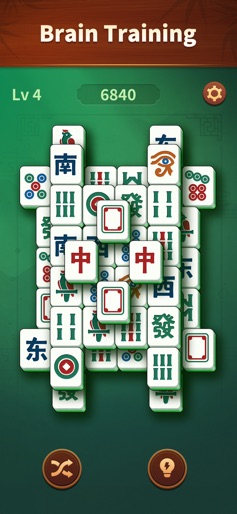


Design Analysis
Visual Design
Style: Custom
Key Features Shown
- •Level Progression
- •High Score Tracking
- •Shuffle/Hint Power-ups
- •Daily Challenge Mode
- •Large Tile Interface
App Insights
Target: Seniors and elderly players seeking cognitive stimulation, as well as casual puzzle enthusiasts looking for low-stress, offline-capable gameplay.
- •Interstitial ads between levels
- •Rewarded video ads
- •Potential (though reportedly non-functional) Ad-free IAP
ASO Keywords:
About Jade Mahjong
Step into Jade Mahjong, a beautifully designed and free mahjong experience that combines peace, logic, and timeless fun. Whether you enjoy classic majong games free or relaxing puzzles, this mahjong game brings calm focus and elegant tile matching to your day. Play your favorite mahjong free game anytime, anywhere — simple to learn, satisfying to master, and always relaxing. A Relaxing Mahjong for All Ages ● Enjoy clear mahjong tiles, smooth controls, and soothing design. ● Each match feels intuitive and rewarding, perfect as mahjong for seniors or anyone who loves classic brain games. ● No ads, no pressure — just the joy of free mahjong play with beautiful visuals and quiet satisfaction. ● Every completed board clears your mind and refreshes your focus. How to Play Tap two identical tiles to match and clear them from the board. Reveal new tiles with every move and think strategically to finish faster. Plan ahead to complete each layout efficiently. Start a new daily puzzle each day for endless fun and fresh challenges. Each puzzle you solve improves focus, memory, and relaxation. Key Features ● Classic Mahjong Free Gameplay: Authentic mahjong experience built for clarity and ease. ● Daily Puzzle Mode: New boards every day to sharpen your mind and keep your mahjong fresh. ● Mahjong for Seniors: Large tiles, gentle colors, and easy controls designed for comfort. ● Beautiful Tiles & Design: Enjoy handcrafted tile patterns inspired by traditional art. ● Majong Games Free Collection: The best free puzzles to relax your brain and pass the time. ● Offline Play: Enjoy mahjong free anywhere — no WiFi needed. Why You’ll Love Jade Mahjong is more than a mahjong free puzzle — it’s a daily ritual of focus and calm. Perfect for fans of majong games free, seniors looking for easy relaxing play, and anyone who loves beautiful tiles and thoughtful challenges. Play your daily puzzle, enjoy mahjong for seniors, and discover peace in every tap. If you liked mahjong games, you’ll love the soothing flow and elegant charm of Jade Mahjong — free to play, endlessly relaxing.
Create screenshots like Jade Mahjong
Use FlyerBanana's free editor to create professional App Store screenshots inspired by Jade Mahjong's design. 100+ templates, device frames, and one-click export.