

App Store Screenshots (5)


Design Analysis
Visual Design
App Insights
About Slidebox: Photo Cleaner App
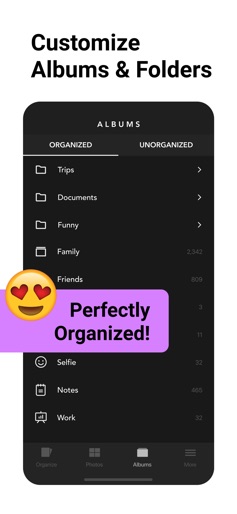
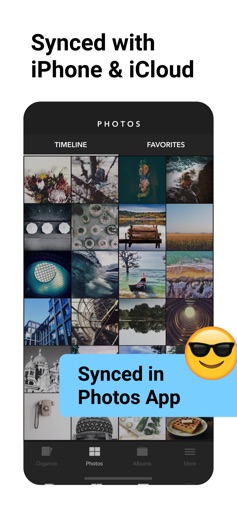
Organize & Clean Up Your Photos with Slidebox – The Ultimate Photo Cleaner & Album Organizer! Slidebox makes managing your photos quick, easy, and satisfying. Say goodbye to clutter and hello to a neatly organized library with just a swipe! Whether you're looking to delete photos, organize albums, or compare duplicate photos, Slidebox is your go-to photo guru for fast and effortless photo cleanup. Key Features to Declutter and Organize Your Photos: - Delete Photos: Easily remove unwanted pics with a simple swipe, freeing up storage instantly. - Album Organizer: Sort photos into albums with a single tap to keep your memories organized. - Compare Similar Photos: Swipe between duplicate photos to decide which ones to keep. - Favorite Moments: Mark your best photos as favorites for quick access. - Undo Actions: Quickly reverse any action, so organizing your photos is stress-free. Slidebox works directly with your Photos App, so any changes you make will sync seamlessly across your iPhone and iCloud. No hassle, no confusion – just a smooth, organized photo library. If your camera roll needs a cleanup, Slidebox is the photo cleaner and album organizer you've been waiting for! With simple swipes and quick gestures, you can take control of your photo storage, remove duplicates, and finally enjoy an organized gallery. Download Slidebox now and experience how easy deleting, sorting, and storing photos can be. In-App Purchases Slidebox offers in-app purchases for users needing additional storage and features, including 10,000+ photos and album cloud storage. All charges are made through your iTunes account, with pricing varying by plan and country. The total price will be clearly displayed before you complete your purchase. Slidebox subscriptions renew automatically, either monthly or annually, depending on your plan. Monthly subscriptions are priced at $4.99 USD, while annual subscriptions cost $49.99 USD (prices may vary outside the U.S.). To avoid renewal, turn off auto-renew at least 24 hours before the end of your current subscription period in your iTunes Account Settings. Slidebox does not offer free trials for these subscriptions. If you prefer a one-time purchase option, you can unlock the full version of Slidebox permanently, which includes all future features and supports ongoing app development. Contact: feedback-ios@slidebox.co Terms of Use: http://slidebox.co/terms.html Privacy Policy: http://slidebox.co/privacy.html
Create screenshots like Slidebox: Photo Cleaner App
Use FlyerBanana's free editor to create professional App Store screenshots inspired by Slidebox: Photo Cleaner App's design. 100+ templates, device frames, and one-click export.
More Photo & Video Apps
View all

Photo Lab Picture Editor & Art
Photo & Video
Canva: AI Photo & Video Editor
Photo & Video


Twitch: Live Streaming
Photo & Video


Video Editor & Maker - InShot
Photo & Video


PicCollage: AI Photo Editor
Photo & Video


Picsart AI Photo Editor, Video
Photo & Video