App Store Screenshots (4)

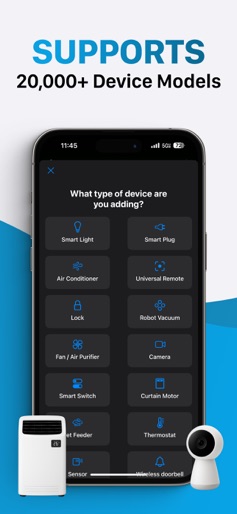


Design Analysis
Visual Design
Style: iOS Native
Key Features Shown
- •Device Management Dashboard
- •Multi-category Device Support
- •RGB Color Wheel Control
- •Climate/Temperature Control
App Insights
Target: Budget-conscious smart home device owners (Tuya/Feit/Gosund) who are looking for a centralized mobile controller for their IoT hardware.
- •Auto-renewable subscriptions
- •Monthly and Yearly plans
ASO Keywords:
About Smart Home Controller App
The Smart Home Controller App helps you manage and control your smart devices, starting with connected smart plugs and switches as well as smart bulbs, smart lights, Wi-Fi cameras, and many more. Simplify Your Smart Life Easily turn your connected devices on or off with a single tap. Whether you're managing a single smart plug or several devices across your home, control is always within reach. Seamless Setup and Control Quickly connect supported devices and manage them directly from your phone. Designed for compatibility with many popular smart home products. Compatible with many products that also work through popular smart life ecosystems built on Tuya smart technology. Essential Smart Home Functionality Focus on what matters most—simple, reliable control of your devices. Power on your coffee maker in the morning or turn off lights from the couch. Intuitive Design The app offers a clean and user-friendly interface, making it easy to get started whether you're new to smart home tech or a seasoned user. Why Choose Smart Home Control App Start your smart life with a focused, no-frills app built for reliable device control. Expand your smart life setup—from a single plug to a full suite of Tuya-powered lights, bulbs, and cameras—all in one place. Premium Subscriptions Get unlimited access with a monthly or yearly plan. Payment is charged to your iTunes Account at purchase and at each renewal. Subscriptions renew automatically unless canceled at least 24 hours before the end of the current period in Account Settings. Privacy Policy and Terms Privacy Policy: https://chorus-labs.com/smart-home-privacy/ Terms of Service: https://chorus-labs.com/smart-home-terms/ Support Email: support@chorus-labs.com Take control of your smart life today. We are not affiliated with or endorsed by Tuya, Feit Electric, Smart Life, or Gosund. All product and brand names are used for identification and compatibility purposes only.
Create screenshots like Smart Home Controller App
Use FlyerBanana's free editor to create professional App Store screenshots inspired by Smart Home Controller App's design. 100+ templates, device frames, and one-click export.