App Store Screenshots (4)


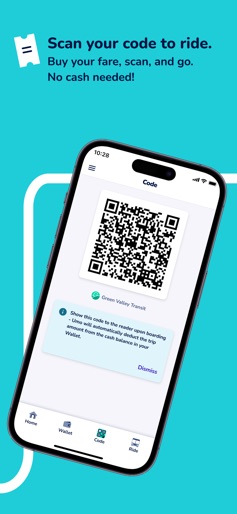
Design Analysis
Visual Design
Style: Custom
Key Features Shown
- •Wallet Balance Tracking
- •Interactive Route Mapping
- •Transaction History
- •Dynamic QR Boarding Code
App Insights
Target: Public transit commuters, students, and urban residents in mid-to-large sized cities where transit agencies have partnered with Cubic/Delerrok.
- •B2B Service Contracts
- •Transaction Commissions
- •Data Licensing
ASO Keywords:
About Umo Mobility
Umo: Your travel companion. Umo is your travel companion, an all-in-one transit app that lets riders at agencies that utilize Umo buy transit passes, get directions, use map navigation, find your bus schedules, and move seamlessly wherever life takes you. Umo gets you where you need to go, displaying transportation closest to you so that you can easily explore, pay and go. Download Umo and get started today! * Simplified Home Screen – The App’s main screen (now accessible from the new ‘Home’ tab) simplifies rider navigation for quick, effortless access to all application features. * Easier agency Location – We have replaced “metro areas” with a new agency selection experience to make it easier for riders to locate an agency near them that uses Umo. Agencies are now clearly listed and sorted by nearness to the rider, ensuring that riders select the correct, intended transit agency when they create an account and purchase fare products. Please note that not all transit agencies use Umo and only those that are available for selection in the App are supported at this time. * Improved Payment Flexibility – Easily buy transit passes or add money to your wallet in the app. Enjoy the unified wallet, convenient payment methods and easy viewing of fare details across agencies. Riders can also now delete their payment method at any time under ‘View My Account’. * Contactless Boarding – The updated version of the App now has quick access to the dynamic QR code used to board from the ‘Code’ tab as well as via ‘Show Code’ links strategically placed throughout the application for faster fare payment. * Real-Time Information – Umo uses real-time data that provides timely and highly accurate bus tracker or trip planning for those transit agencies that support this functionality. * Trip Planning – Intuitive navigation for easy journey planning in the App. * Enhanced Ride History – Riders now have access to more ride-history details, including month-by-month or an abbreviated history directly from the main menu for easy tracking and management. * Accessibility – The updated Umo App is fully integrated with VoiceOver, providing an accessible and seamless navigation experience for visually impaired riders. * Favorites and Next Stop Alerts – Select your favorite station or stop and opt in to next-stop alerts—so you’re always on-time. * Localization – Umo supports English, Spanish and French languages. Simply adjust your Settings to your preferred language.
Create screenshots like Umo Mobility
Use FlyerBanana's free editor to create professional App Store screenshots inspired by Umo Mobility's design. 100+ templates, device frames, and one-click export.