VicoHome: Smart Home Camera
PHOTON SAIL TECHNOLOGIES PTE. LTD.
Create Screenshots Like VicoHome: Smart Home CameraApp Store Screenshots (4)


Design Analysis
Visual Design
App Insights
About VicoHome: Smart Home Camera
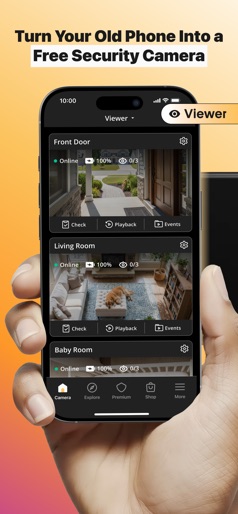
Introducing VicoHome, the smart home camera app designed to bring peace of mind directly to your fingertips. With VicoHome, effortlessly monitor your property from anywhere, anytime. Keep an eye on what matters with live video and greet visitors with Two-Way Talk. Receive instant notifications for any detected motion, so important moments never slip by unnoticed. With the convenience of multiple-user access, keeping your family in the loop has never been easier. 【VicoHome Awareness Service】 Elevate your security with the VicoHome Awareness Subscription to unlock next-level features: 1. Extra Cloud Storage: Gain access to up to 60 days of recording history, ensuring you never miss a moment. 2. Smart Push: Benefit from alerts for person, vehicle, package, and pet detection, allowing you to concentrate on the notifications that truly matter. 3. Activity Zone: Customize and filter alerts by setting up specific activity zones, reducing unnecessary notifications and enhancing your focus on key areas. 【Details of the Awareness Service】 Awareness Gen2 Single Plan ( Subscribe monthly) Awareness Gen2 Single Plan ( Subscribe annually) Awareness Gen2 Unlimited Plan (Subscribe monthly) Awareness Gen2 Unlimited Plan (Subscribe annually) 【Subscription Guidelines】 Cancel auto renewal: Please manually turn off the automatic renewal function in iTunes/Apple ID settings at least 24 hours prior to the expiration time of your subscription. Renewal: iTunes account will be charged automatically within 24 hours prior to the expiration time of your subscription. If the renewal is successful, the subscription will be extended by one subscription period. Privacy Policy: https://api-us.vicoo.tech/management/app-files/vicoo/privacy-policy/en/index.html Awareness Service Agreement: https://api-us.vicoo.tech/management/app-files/vicoo/awareness-service-agreement/en/index.html Continuous Subscription Service Agreement: https://api-us.vicoo.tech/management/app-files/vicoo/continuous-subscription-service-agreement/en/index.html
Create screenshots like VicoHome: Smart Home Camera
Use FlyerBanana's free editor to create professional App Store screenshots inspired by VicoHome: Smart Home Camera's design. 100+ templates, device frames, and one-click export.