

App Store Screenshots (6)

Design Analysis
Visual Design
App Insights
About WeightBuddy: Calorie Tracker
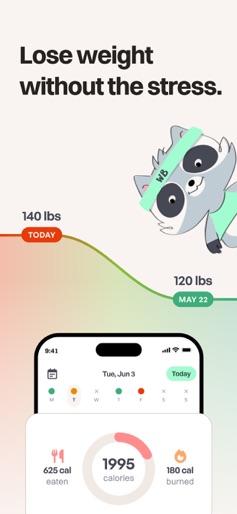
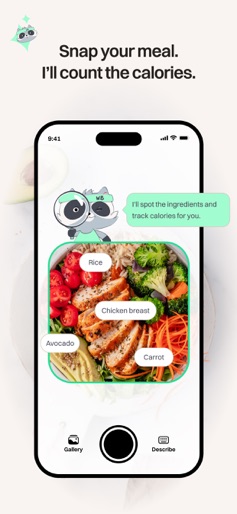
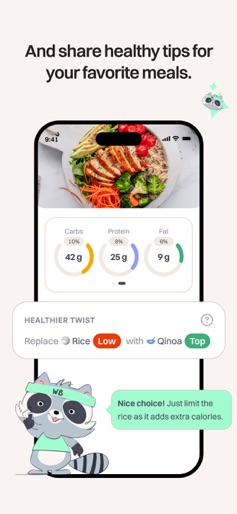
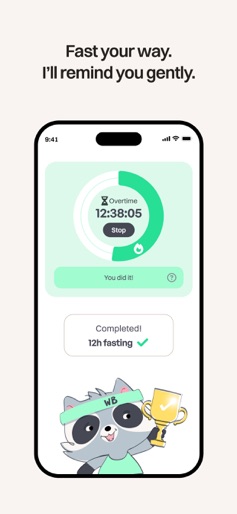
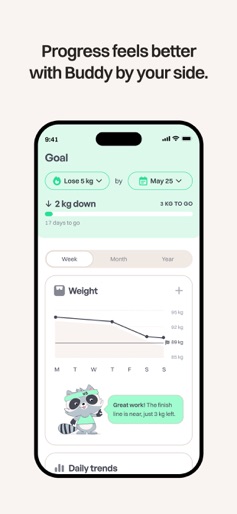
The Simple Way to Lose Weight with AI Calorie Tracker & Support Losing weight shouldn’t feel like a second job. WeightBuddy simplifies weight loss with an AI calorie tracker and food tracker that make logging meals effortless. Just snap a photo, get instant calorie insights, and follow a personalized diet built for real life. Whether you want to burn fat, improve nutrition, or finally stick to a diet that works, WeightBuddy makes the process clear and easy so you can lose weight without stress. WeightBuddy combines a fast calorie counter with supportive guidance from Buddy, your AI companion. Instead of complicated charts or overwhelming menus, you get a calorie tracker that understands your meals, tracks macros and fat, and adapts to your goals. This creates a smoother weight management system that helps you lose weight in minutes a day. How WeightBuddy Helps You Lose Weight Effortlessly 1. Snap Your Food — AI Tracks Calories Instantly Skip the typing and searching. The AI calorie tracker analyzes meals in seconds, giving accurate calorie, fat, and macro data. As a food tracker, it removes guesswork and makes your personalized diet easy to follow. 2. Smart Calorie Counter for Real-Life Nutrition The calorie counter learns your patterns, helping you understand calories and nutrition without overwhelm. It supports flexible eating, better decisions, and long-term weight loss. Whether you’re cutting fat or improving your diet, the calorie tracker keeps things simple. 3. Built-In Intermittent Fasting Tools If you practice intermittent fasting, WeightBuddy helps you stay consistent. Track fasting windows, support fat burning, and combine fasting with calorie awareness to improve weight management naturally. 4. Personalized Diet Guidance from Buddy Buddy provides encouraging tips based on your calorie intake, nutrition habits, and fat-burning goals. This personalized diet approach supports weight loss without judgment. You’ll always know your next best step. 5. Clear Progress Tracking for Better Weight Management See how your calorie tracking adds up day after day. With a simple calorie counter and food tracker, you can measure progress, understand patterns, and lose weight with confidence. Why WeightBuddy Works Better Than Traditional Calorie Counters Most calorie counter apps require endless manual input. WeightBuddy uses AI to turn the hardest parts of weight loss—calorie tracking, food logging, nutrition insights, fat awareness, and personalized diet planning—into automatic steps. This calorie tracker is built for busy people who want to lose weight efficiently. You get: • A calorie tracker that logs meals instantly • A fast calorie counter accurate enough for weight loss and fat burning • A food tracker that understands your diet without extra effort • A personalized diet approach that adapts to your lifestyle • Nutrition guidance that feels supportive, not overwhelming WeightBuddy keeps weight management simple so you can stick with it long enough to see results. Key Features • AI Calorie Tracker: Scan meals for automatic calorie, fat, and nutrition insights. • Food Tracker: Track calories effortlessly with photo-based logging. • AI Calorie Counter: Fast, accurate calorie estimates to support weight loss. • Personalized Diet Plans: Buddy helps you follow a flexible, sustainable diet. • Intermittent Fasting Support: Track fasting windows and enhance fat burning. • Weight Management Tools: Clear progress charts to help you lose weight steadily. WeightBuddy gives you a calorie tracker, calorie counter, food tracker, personalized diet support, intermittent fasting tools, and weight management insights—all in one simple experience. If you want an easier way to lose weight, improve nutrition, and burn fat without complexity, WeightBuddy is the companion that makes it possible. Privacy Policy: https://www.weightbuddy.com/privacy-policy Terms: https://www.weightbuddy.com/terms-conditions
Create screenshots like WeightBuddy: Calorie Tracker
Use FlyerBanana's free editor to create professional App Store screenshots inspired by WeightBuddy: Calorie Tracker's design. 100+ templates, device frames, and one-click export.
More Health & Fitness Apps
View all

Flo Cycle & Period Tracker
Health & Fitness


CVS Health
Health & Fitness


Clue Cycle & Period Tracker
Health & Fitness


Headspace: Meditation & Sleep
Health & Fitness


Noom Weight Loss, Food Tracker
Health & Fitness


Impulse - Brain Training
Health & Fitness