App Store Screenshots (8)



Design Analysis
Visual Design
App Insights
About Zoom Workplace
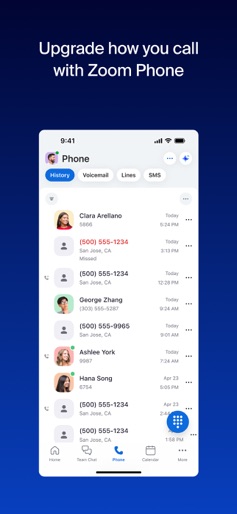
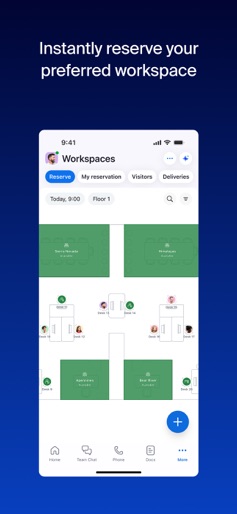
Reimagine teamwork with Zoom Workplace, an AI-first, open collaboration platform that combines team chat, meetings, phone*, whiteboard, calendar, mail, docs, and more. Use Zoom Workplace for iOS with any free or paid Zoom license. And with your Pro or Business Zoom license you have access to AI Companion woven throughout Zoom Workplace. You can get caught up quickly with a summary and key points from your unread messages, draft new content, and keep conversations focused and impactful. It’s your personal assistant across Zoom Workplace, available at no additional cost with your paid Zoom license, available wherever you are from your mobile device. BE MORE PRODUCTIVE ON THE GO WITH AI COMPANION* ON YOUR MOBILE DEVICE Quickly get prepared for upcoming meetings Have AI Companion* generate a first draft of content Get a summary of your unread Team Chat messages STREAMLINE COMMUNICATIONS WITH A SINGLE APP Schedule or join a video meeting with one tap Chat with colleagues and external contacts Place and receive phone calls or send SMS text messages* IMPROVE PRODUCTIVITY Organize and share information at scale with Zoom Docs Receive automated meeting summaries with AI Companion* Brainstorm on virtual whiteboards BOUNCE BETWEEN LOCATIONS Move a live meeting or call seamlessly between devices with one tap Start a Zoom Rooms meeting and share content* Multitask with Picture in Picture on iPhone or Split View on iPad WORK SAFELY ON THE GO Stay focused on the road with Apple CarPlay support Customize Siri Shortcuts for hands-free voice commands Keep your data secure with enterprise-grade security and SSO* * A paid Zoom Workplace subscription or other license may be required to use certain product features. Upgrade your free account today to start gaining these benefits. AI Companion may not be available for all regions and industry verticals. Some features not currently available across all regions or plans and are subject to change. UPGRADE YOUR FREE ACCOUNT TO ZOOM WORKPLACE PRO AND GET AI COMPANION INCLUDED Host unlimited meetings up to 30 hours each Record meetings to the cloud (up to 10GB) Assign meeting co-hosts and schedulers Your Zoom Workplace Pro subscription will automatically renew unless you cancel at least 24 hours before the end of the free trial or the plan billing period. After you start your subscription, you can manage it from either App Store settings or iOS settings. The amount charged to the payment method in your App Store account will vary by the plan you select and your country. The plan price will be displayed before you start your free trial or confirm your purchase. We’d love to hear from you! Join the Zoom community: https://community.zoom.com/ Follow us on social media @zoom Terms of Service: https://www.zoom.com/terms/ Privacy Statement: https://explore.zoom.us/privacy/ Have a question? Contact us at https://support.zoom.com/hc
Create screenshots like Zoom Workplace
Use FlyerBanana's free editor to create professional App Store screenshots inspired by Zoom Workplace's design. 100+ templates, device frames, and one-click export.