

App Store Screenshots (5)



Design Analysis
Visual Design
App Insights
About CashTrails+: Personal Finance
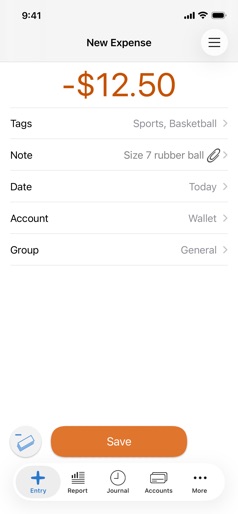
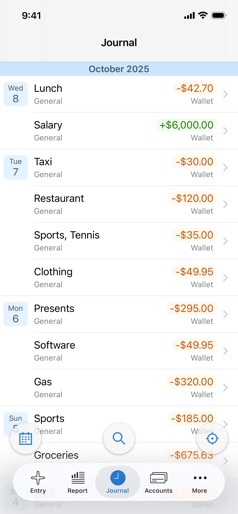
"How much am I spending each month? Are my savings growing? How expensive was the last vacation? What were my business expenses this year?" If you're asking yourself any of these questions, CashTrails is here to help, featuring: GENERAL: • Tracking both expenses and income. • Seamless sync via iCloud. • Support for multiple accounts and transfers between them. • All records, accounts, tags, parties and groups can be edited or deleted at any time. • Photo attachments. • Passcode protection to hide your financial data from unwanted eyes. • Recurring records, both expenses and incomes, with rich frequency options. • History to view and adjust your previous records. • Tags to organize your records the way you like. • Ability to specify vendors/payees and clients/payers (parties). • Groups to separate your regular expenses from business or holiday trips. • Time of records is recorded as well. • "Refund" records. • Calculator. • Search. REPORTS: • Flexible, configurable reports. • Timeline bar graph reports for days, weeks, months, and years, with whatever filter you set. • Structure of expenses and income, split by tags, parties, accounts or groups, in percentages and absolute amounts, for any report filter. • Daily, weekly and monthly averages. • Reports for particular hours. • Instant account balances. • Report filter presets - switch between your favorite reports with just a tap. MULTIPLE CURRENCIES: • Full support for over 160 world currencies. • Quick toggle between the currencies you're using most often. EXPORT AND IMPORT: • Ability to analyze your records in a spreadsheet using CSV export. • Backup and restore CashTrails data and settings.
Create screenshots like CashTrails+: Personal Finance
Use FlyerBanana's free editor to create professional App Store screenshots inspired by CashTrails+: Personal Finance's design. 100+ templates, device frames, and one-click export.
More Finance Apps
View all

Zillow Real Estate & Rentals
Finance


Bank of America Mobile Banking
Finance


Robinhood: Trading & Investing
Finance


GEICO Mobile - Car Insurance
Finance


Branch: Instant Loan & Banking
Finance


FanDuel Sportsbook & Casino
Finance