ExamGOAL: Exam Preparation App icon

ExamGOAL: Exam Preparation App

ExamGOAL

Education
4.9(7.5K ratings)
Free
Create Screenshots Like ExamGOAL: Exam Preparation App

App Store Screenshots (24)

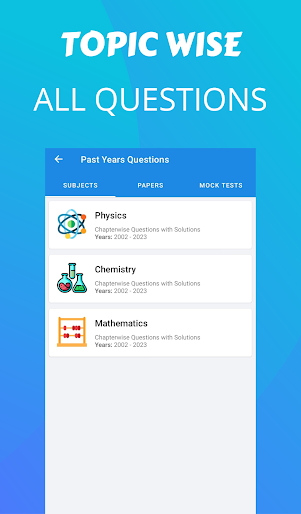
ExamGOAL: Exam Preparation App screenshot 1
ExamGOAL: Exam Preparation App screenshot 2
ExamGOAL: Exam Preparation App screenshot 3
ExamGOAL: Exam Preparation App screenshot 4
ExamGOAL: Exam Preparation App screenshot 5
ExamGOAL: Exam Preparation App screenshot 6
ExamGOAL: Exam Preparation App screenshot 7
ExamGOAL: Exam Preparation App screenshot 8
ExamGOAL: Exam Preparation App screenshot 9
ExamGOAL: Exam Preparation App screenshot 10
ExamGOAL: Exam Preparation App screenshot 11
ExamGOAL: Exam Preparation App screenshot 12
ExamGOAL: Exam Preparation App screenshot 13
ExamGOAL: Exam Preparation App screenshot 14
ExamGOAL: Exam Preparation App screenshot 15
ExamGOAL: Exam Preparation App screenshot 16
ExamGOAL: Exam Preparation App screenshot 17
ExamGOAL: Exam Preparation App screenshot 18
ExamGOAL: Exam Preparation App screenshot 19
ExamGOAL: Exam Preparation App screenshot 20
ExamGOAL: Exam Preparation App screenshot 21
ExamGOAL: Exam Preparation App screenshot 22
ExamGOAL: Exam Preparation App screenshot 23
ExamGOAL: Exam Preparation App screenshot 24

Design Analysis

Visual Design

App Insights

About ExamGOAL: Exam Preparation App

šŸš€ Launch your study journey with ExamGOAL, the all-in-one exam preparation app designed for students targeting high-stakes exams like JEE, NEET, GATE, and CBSE Board Exams. This app is your personal tutor and guide, offering customized tools and resources to enhance your learning experience and boost your exam performance. Key Features: 1. šŸ“š Comprehensive Question Bank: Questions for JEE, NEET, and CBSE are provided by our students, with solutions crafted by our experts, allowing you to practice with highly relevant and challenging content. 2. šŸ“ Mock Tests with Solutions: Engage in PYQ mock tests that mimic the actual exams, followed by detailed solutions to help you understand and master key concepts. 3. ā±ļø Practice Modes: Choose between a realistic mock test mode and a more flexible normal practice mode, catering to your specific study preferences. 4. šŸ” In-depth Test Analysis: After each mock test, receive a comprehensive analysis of your performance, identifying your strengths and areas for improvement. 5. 🌟 Bookmark Favorite Questions: Easily save and revisit challenging or significant questions, ensuring you have a strong grasp of the most difficult topics. 6. šŸ“ˆ Preparation Tracker: Monitor your study progress for JEE, NEET, GATE, and CBSE Board exams across subjects, chapters, and topics. 7. šŸŽÆ Daily Goals: Set and achieve daily targets for solving PYQs, helping you maintain a consistent and effective study routine. 8. šŸ“˜ Detailed Exam Syllabus: Gain access to in-depth syllabus information for each exam category, ensuring you cover every essential topic. Subscription Details: šŸ†“ Start with a free trial and then select from various subscription options (monthly, quarterly, annual) to continue enjoying all the app's features. Get ready to conquer your exams with šŸŽÆ ExamGOAL: the ultimate tool for success in JEE, NEET, GATE, and CBSE Board exams. Source for GATE Questions: IIT Roorkee's official GATE website (https://gate2025.iitr.ac.in/download.html). Please note: ExamGOAL is not affiliated or associated with any government entity.

Create screenshots like ExamGOAL: Exam Preparation App

Use FlyerBanana's free editor to create professional App Store screenshots inspired by ExamGOAL: Exam Preparation App's design. 100+ templates, device frames, and one-click export.


More Education Apps

View all

Frequently Asked Questions

How can I create screenshots like ExamGOAL: Exam Preparation App?
You can create App Store screenshots inspired by ExamGOAL: Exam Preparation App using FlyerBanana's free screenshot editor. Choose from 100+ templates, customize colors, text, and device frames, then export in all required sizes.
What screenshot sizes does ExamGOAL: Exam Preparation App use?
ExamGOAL: Exam Preparation App uses standard App Store screenshot sizes including 6.7" (1290Ɨ2796px), 6.5" (1284Ɨ2778px), and 5.5" (1242Ɨ2208px) for iPhones. FlyerBanana supports all required sizes with one-click export.
Can I use ExamGOAL: Exam Preparation App's screenshot style for my app?
Yes! While you shouldn't copy screenshots directly, you can use ExamGOAL: Exam Preparation App's design patterns as inspiration. FlyerBanana's templates let you create professional screenshots with similar layouts, color schemes, and visual styles.
What makes good Education app screenshots?
The best Education app screenshots clearly showcase key features, use consistent branding, include compelling copy, and follow App Store guidelines. Browse our Education inspiration gallery to see what top apps do well.