

App Store Screenshots (7)


Design Analysis
Visual Design
Style: Custom
Key Features Shown
- •100+ Fonts Library
- •Custom Keyboard Themes
- •Instagram Bio Customization
- •Kaomoji & Symbols
- •Auto-correct Functionality
App Insights
Target: Social media users (Gen Z and Millennials) looking to customize their Instagram, WhatsApp, and TikTok profiles and messages.
- •Weekly Subscription
- •Annual Subscription
ASO Keywords:
About Fonts Keyboard Themes & Emoji
Stylish fonts make you stand out in Instagram or WhatsApp! We provide new text styles with 100+ stylish fonts, symbols, kaomoji, emojis, and themes. Emo? Gothic? Romantic? Chill? Kawaii? What are you feeling right now? Use Fonts Keyboard to express your every thought and mood in a fancy way. Directly type into Instagram, WhatsApp, Snapchat, Discord, and many more apps. People can see your latest cool texts without installing the app. Tons of keyboard themes & colors are available! Cute? Nature? Flowers? Unique? Color? It’s totally up to you. The basic keyboard color (light/dark mode) will automatically match your system settings. Available in All Scenes: √ Texting and online chatting; √ Creating stories; √ Posting tweets; √ Instagram bios; √ Editing post descriptions; √ Social media nicknames; √ Writing diaries; √ Discover more fun by yourself - the sky is the limit! 100+ Choices for You: √ Stylish fonts √ Cool symbols √ Emojis √ Cute Kaomoji Download our app now to express yourself better! Subscription Terms and Details - Get unlimited access to all features for USD $1.99/week, USD $19.99/year. - The payment will be charged to your iTunes account at confirmation of purchase. - The subscription automatically renews unless auto-renew is turned off at least 24 hours before the end of the current period. - Subscription may be managed and auto-renewal may be turned off by going to Account Settings after purchase. - The account will be charged for renewal within 24 hours prior to the end of the current period. - Any unused portion of a free trial period will be forfeited when the user purchases a subscription to that publication. Privacy Policy: https://abishkking.com/privacypolicy.html?ios_mretheod=1&pkg=com.abishkking.fontkeyboard Terms of Use: https://pay.mobihealthplus.com/app/fontkeyboard.html
Create screenshots like Fonts Keyboard Themes & Emoji
Use FlyerBanana's free editor to create professional App Store screenshots inspired by Fonts Keyboard Themes & Emoji's design. 100+ templates, device frames, and one-click export.
More Design Apps
View all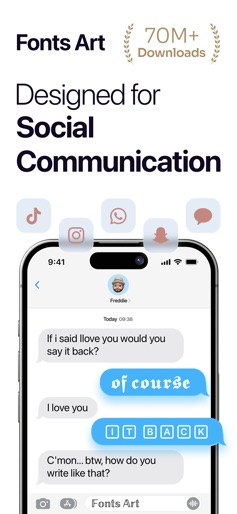
Fonts Art - Keyboard Fonts
Design


Photo Collage - Collage Maker
Design


Themify - Widget & Icon Themes
Design


VSCO: Photo Editor & Presets
Design


Business Card Maker, Visiting
Design
iScreen - Widgets & Wallpaper
Design