
ISSEN: Language Voice Tutor icon

ISSEN: Language Voice Tutor

Issen

Education
4.6(199 ratings)
Free
Create Screenshots Like ISSEN: Language Voice Tutor

App Store Screenshots (6)

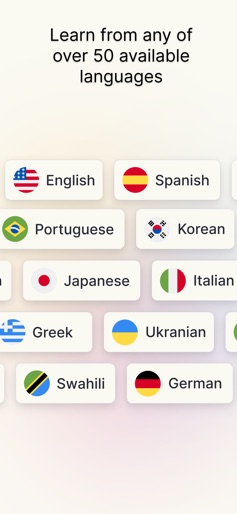
ISSEN: Language Voice Tutor screenshot 1
ISSEN: Language Voice Tutor screenshot 2
ISSEN: Language Voice Tutor screenshot 3
ISSEN: Language Voice Tutor screenshot 4
ISSEN: Language Voice Tutor screenshot 5
ISSEN: Language Voice Tutor screenshot 6

Design Analysis

Visual Design

App Insights

About ISSEN: Language Voice Tutor

ISSEN the most advanced realtime AI voice tutor that helps you achieve fluency in a fun way. Want to practice new grammar, role-play situations like business meetings or dates, or talk about your personal life? You can do all of this and more in ISSEN. You tutors will remember your conversations and preferences, and each tutor has their own experiences, personality, and style. You can also choose your tutor's accent, slang, and complexity level, and talk for as long as you'd like! Becoming fluent in a new language requires immersing and talking in real-life situations, and ISSEN is the most engaging and convenient way to do this. Start your path to fluency now, and experience the future of language learning! Features - Fully realtime human-like voice conversations - Over 50 languages supported - Choose different AI tutor accents - Completely customized curriculum for your goals - Hundreds of grammar lessons - Save and review vocabulary - Translation and shadowing drills - Flashcard system with spaced repetition Includes sound effects/music from ZapSplat, credited as required.

Create screenshots like ISSEN: Language Voice Tutor

Use FlyerBanana's free editor to create professional App Store screenshots inspired by ISSEN: Language Voice Tutor's design. 100+ templates, device frames, and one-click export.


More Education Apps

View all

Frequently Asked Questions

How can I create screenshots like ISSEN: Language Voice Tutor?
You can create App Store screenshots inspired by ISSEN: Language Voice Tutor using FlyerBanana's free screenshot editor. Choose from 100+ templates, customize colors, text, and device frames, then export in all required sizes.
What screenshot sizes does ISSEN: Language Voice Tutor use?
ISSEN: Language Voice Tutor uses standard App Store screenshot sizes including 6.7" (1290×2796px), 6.5" (1284×2778px), and 5.5" (1242×2208px) for iPhones. FlyerBanana supports all required sizes with one-click export.
Can I use ISSEN: Language Voice Tutor's screenshot style for my app?
Yes! While you shouldn't copy screenshots directly, you can use ISSEN: Language Voice Tutor's design patterns as inspiration. FlyerBanana's templates let you create professional screenshots with similar layouts, color schemes, and visual styles.
What makes good Education app screenshots?
The best Education app screenshots clearly showcase key features, use consistent branding, include compelling copy, and follow App Store guidelines. Browse our Education inspiration gallery to see what top apps do well.


