

App Store Screenshots (6)



Design Analysis
Visual Design
App Insights
About LEO dictionary
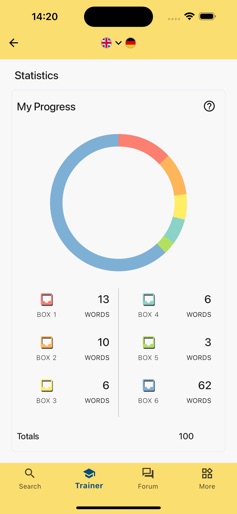
This app offers free access to LEO's dictionaries, vocab trainer and forums. Are you in need of a reliable language reference? LEO’s comprehensive dictionaries include wide-ranging vocabulary, example sentences and audio pronunciation. Or would you like to take a foreign language to the next level? Why not try our vocab trainer with its tried-and-tested spaced repetition system. In LEOs Forum kannst du dir zudem Rat zu Sprachfragen holen, die über eine reine Wörterbuchfunktion hinausgehen. Our dictionaries contain around 2,944,000 entries and is being updated as you read this. * English ⇔ German (840,000 entries) * French ⇔ German (280,000 entries) * Spanish ⇔ German (261,000 entries) * Italian ⇔ German (258,000 entries) * Chinese ⇔ German (238,000 entries) * Russian ⇔ German (373,000 entries) * Portuguese ⇔ German (171,000 entries) * Polish ⇔ German (99,000 entries) * English ⇔ Spanish (232,000 entries) * Spanish ⇔ Portuguese (77,000 entries) * English ⇔ French (61,000 entries) * English ⇔ Russian (54,000 entries) With LEO you can do more than just look up the meaning of a word in a different language. LEO also provides: * noun and verb tables * real voice audio pronunciation (no speech synthesis) * definitions * grammar and etymology, as well as other information relevant to the search term(s) including * orthographically similar words * possible base forms for inflected words * links to forum discussions containing the search term(s) Vocabulary trainer Our free vorab trainer is the perfect companion to build your vocabulary – whether at school or on your holidays. All you need is a free user account and you’re good to start your learning journey. * Use our curated wordlists to practice vocabulary used in German textbooks at secondary schools * Learn words with LEO’s spaced repetition system * Create your own wordlists – be it for school, for professional contexts or for your holidays * Set your learning targets and learn at your own speed * Enhance your language skills with a sustainable approach * Collect as many words and phrases as you like – there is no word limit even in the free version of our app Forums The LEO Forum exists to provide a platform for language-related questions that are not answered in the dictionary. If you would like to get help from other users or contribute to questions yourself, you need to register a user account (free of charge). The app contains adverts which you can choose to remove by subscribing to our ad-free version. https://www.apple.com/legal/itunes/appstore/dev/stdeula You can find a detailed description of all of our services on our website https://www.leo.org
Create screenshots like LEO dictionary
Use FlyerBanana's free editor to create professional App Store screenshots inspired by LEO dictionary's design. 100+ templates, device frames, and one-click export.










