

App Store Screenshots (8)




Design Analysis
Visual Design
Style: iOS Native
Key Features Shown
- •Voice Translation
- •Conversation Mode
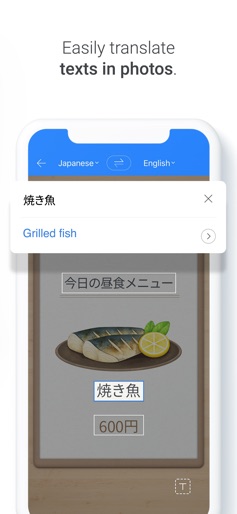
- •Image Translation
- •Study Camera (Edu Mode)
- •My Notes/Flashcards
App Insights
Target: Global travelers, language students (specifically K-pop/K-drama fans), and business professionals interacting with East Asian markets.
- •Ad-supported (based on user reviews)
- •Data collection for AI training
- •Ecosystem lock-in (Naver services)
ASO Keywords:
About Naver Papago - AI Translator
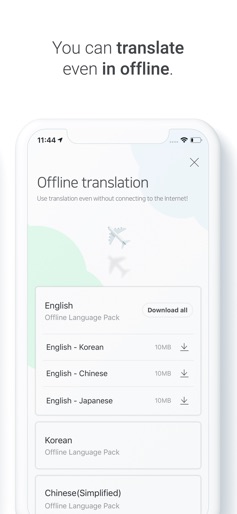
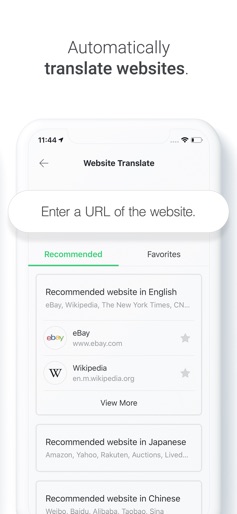
Whenever you need translation during your travels, business trips or while studying a language just bring Papago, a smart parrot who can translate multiple languages for you. ▶ What does ‘Papago’ mean? In Esperanto, Papago refers to a parrot, a bird with language abilities. Papago supports 14 languages : Korean, English, Japanese, Chinese (Simplified/Traditional), Spanish, French, Vietnamese, Thai, Indonesian, Russian, German, Italian and Arabic. ▶ Main features 1) Text Translation Real-time text translation for phrases and words 2) Image Translation Automatic recognition and translation of text in the image by taking a picture and pressing the button 3) Voice Translation Real-time voice translation to both text and audio 4) Offline translation Can translate even in offline 5) Conversation Translation Simultaneously speak in each other’s language when talking one-on-one with a foreigner 6) Handwriting Translation Handwriting translation that finds the correct word and translation when you write using your finger 7) Website Translation Automatic translation for all content when you include the URL of a foreign website 8) Edu Taking a picture of the passage you want to study will create a My Note that you can use to study passages and words 9) Dictionary Dictionary information provided to check additional meanings other than initial translation results Be confident anytime, anywhere with your translating partner Papago! Papago Facebook Like : https://www.facebook.com/NaverPapago Papago Instagram Follow : https://www.instagram.com/papago_naver/ ※ Speech recognition permission provided by the mobile OS is used to provide voice translation and dialog translation in Vietnamese, Thai, Indonesian, Russian, and Italian. If you use voice translation or dialog translation in these languages after granting speech recognition permission, only voice data will be sent to Apple as per Apple's policy; no other information will be sent. ※ Supporting iOS 15.0 or above ※ Available on PC and mobile. https://papago.naver.com ※ For app-related issues and errors: https://goo.gl/9LZLRe Developer Contact No.: 1588-3820 178-1, Green Factory, Jeongja-dong, Bundang-gu, Seongnam-si, Gyeonggi-do, Seoul
Create screenshots like Naver Papago - AI Translator
Use FlyerBanana's free editor to create professional App Store screenshots inspired by Naver Papago - AI Translator's design. 100+ templates, device frames, and one-click export.










