

App Store Screenshots (5)
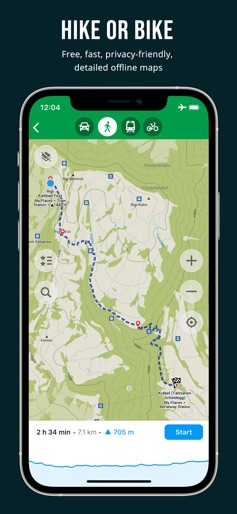


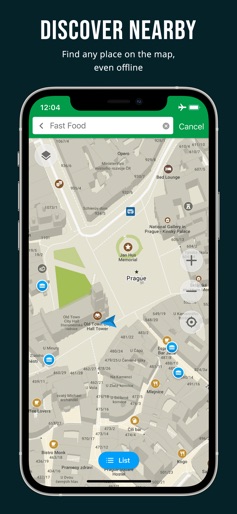

Design Analysis
Visual Design
Style: iOS Native
Key Features Shown
- •Hiking/Cycling route profile
- •POI Bookmarking
- •Turn-by-turn navigation
- •Nearby search
- •Privacy feature checklist
App Insights
Target: Privacy-conscious travelers, hikers, cyclists, and users in regions with expensive data or poor connectivity.
- •Donations
- •Community contributions
- •Open-source development
ASO Keywords:
About Organic Maps・Offline Map & GPS
Offline maps for travel, hikes, and rides. Smooth navigation without signal or battery drain. OpenStreetMap data, 100% free, ad-free. Organic Maps is a fast, detailed offline map and GPS navigation app for travel, hikes, and rides. Plan, import, and record routes, and enjoy smooth guidance without draining your battery or using an internet connection. Explore places and navigate safely during your outdoor adventures and travels around the world. The app offers unlimited map downloads and biweekly updates. OpenStreetMap-based, volunteer-made, privacy-first, 100% offline, and 100% free. OFFLINE: The app works 100% offline — including search and navigation. You can explore the map and navigate without an internet connection, saving on mobile data and roaming fees. And with no background data transfers, your battery lasts much longer. FAST: Zooming, search, and route calculations work noticeably fast. DETAILED & UPDATED: The maps are rich in detail and refreshed twice a month to reflect real-world conditions. Unlike many well-known competitors, they include building labels, benches, hiking paths, and other helpful information. OPENSTREETMAP-BASED: OpenStreetMap is a wiki-style world map built and maintained by millions of volunteers — locals who know their areas best. This community effort results in highly detailed maps, often more accurate than commercial ones in less-mapped regions. Organic Maps updates its data from OpenStreetMap every two weeks, keeping your maps fresh and reliable. And if you notice something missing, you can add it to OpenStreetMap and help improve the map for everyone. PRIVACY-FIRST: We don’t collect any data or identifiers. This means there’s no risk of data leaks and no distractions like ads or noisy notifications — just a clean, private map experience. IMPORTANT FEATURES EXPLORE PLACES: Search by address, name, or category, discover millions of POIs, and view detailed information such as opening hours, Wikipedia articles, wheelchair accessibility, and other helpful details. All available offline. GPS NAVIGATION: Enjoy voice-guided, turn-by-turn directions. Create walking, hiking, cycling, or driving routes — including routes between cities, countries, and multiple waypoints. Find the best routes for your metro journeys and commutes. CarPlay is supported. HIKING & CYCLING TRAILS FROM AROUND THE WORLD: Enable special map layers to discover popular hiking and cycling routes worldwide, all sourced from OpenStreetMap. Switch between layers to see colored bike and MTB routes, as well as official hiking paths. PUBLIC TRANSPORT: See public transport route numbers at stops. Live transport schedules and routing are currently in development. MAP STYLES: Choose map layers that fit your activity — Outdoors, Contour Lines, Hiking, Cycling, or Metro/Subway. TRACK RECORDER: Record, import, export, and share your routes and favorite places. Supports KML, KMZ, GPX, and GeoJSON formats. WIKIPEDIA ARTICLES: Explore Wikipedia articles for places you discover on the map. Type “?wiki” in the search to find all places with Wikipedia articles. MAP EDITOR: Contribute to OpenStreetMap by adding missing places or editing the map directly from Organic Maps. DARK MODE: Switch to a dark theme for comfortable viewing at night. iCLOUD SYNC: Easily back up and sync all your bookmarks and tracks via iCloud. Try the app — it’s 100% free, ad-free, fast, and fully offline. Enjoy a fast, reliable, and private map experience, and share it with others! Organic Maps is an indie, community-driven, open-source project with hundreds of contributors who help develop new features, fix issues, translate, and move the project forward. Join the community on Telegram: @OrganicMapsApp Or learn other ways to support the project: https://organicmaps.app/contribute/ Your honest feedback and reviews in the store motivate us! We love hearing from you there. Have questions? Please visit the organicmaps.app website for additional details and FAQ.
Create screenshots like Organic Maps・Offline Map & GPS
Use FlyerBanana's free editor to create professional App Store screenshots inspired by Organic Maps・Offline Map & GPS's design. 100+ templates, device frames, and one-click export.
More Maps & Navigation Apps
View all

United Airlines
Maps & Navigation


Google Maps
Maps & Navigation


Southwest Airlines: Travel App
Maps & Navigation


The Weather Channel - Radar
Maps & Navigation


Expedia: Hotels, Flights, Cars
Maps & Navigation


Waze Navigation & Live Traffic
Maps & Navigation