

App Store Screenshots (6)



Design Analysis
Visual Design
Style: iOS Native
Key Features Shown
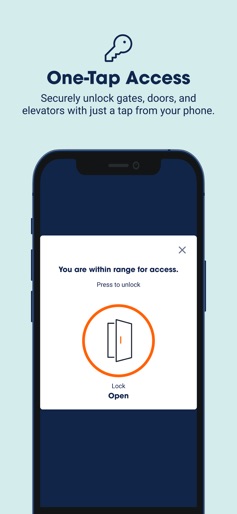
- •Contactless Gate Access
- •Account Summary
- •AutoPay Management
- •Support Help Center
- •Facility Floor Plan/Map
App Insights
Target: Residential and commercial customers needing temporary or long-term space for furniture, vehicles, or business inventory.
- •Physical Service Rental
- •Insurance Upsell
- •Administrative Fees
- •Late Fees
ASO Keywords:
About Public Storage
ABOUT THIS APP We take the stress out of storage. Now we've made your self-storage experience even easier. With the free Public Storage app, you have everything you need for contactless storage in the palm of your hands: gate access, bill pay, account management, customer support and more! OPEN GATES & DOORS: Breeze right past the keypads at virtually every location. Just tap your phone and go. Once you’re within range of a gate, door or elevator, you gain access to your self-storage space with a touch. So every visit to your Public Storage unit is speedier. PAY YOUR BILL: Make monthly payments in a snap. Pay your bill or activate AutoPay with one tap for easy, contactless payments. Get notified when rent is due so you’re always on time and freed from late fees. KEEP YOUR ACCOUNT IN CHECK: Manage one or multiple accounts and storage units, all in one place. Update your payment preferences and other settings without a call to customer service or visit to your local Public Storage facility. TALK TO THE SUPPORT TEAM: Get the help you need, right when you need it. Find answers to critical questions. Call for instant support from our friendly customer service team. Drop us a quick note for important, but less timely storage needs. ABOUT PUBLIC STORAGE: Since opening our first self-storage location in 1972, we’ve grown to become the largest owner and operator of storage facilities in the world. With thousands of locations across the U.S. and Europe, and more than 170 million net rentable square feet of real estate, we have the space you need right in your neighborhood. With complete storage solutions of all sizes, there’s always a storage unit near you that lets you make extra space in your garage or basement, store your car or RV and find a temporary place for your furniture. Plus, flexible month-to-month contracts mean you can adjust your storage space to your short-term or long-term needs.
Create screenshots like Public Storage
Use FlyerBanana's free editor to create professional App Store screenshots inspired by Public Storage's design. 100+ templates, device frames, and one-click export.











