App Store Screenshots (8)



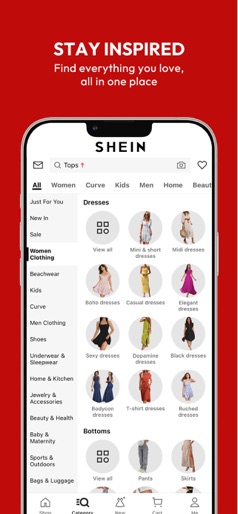
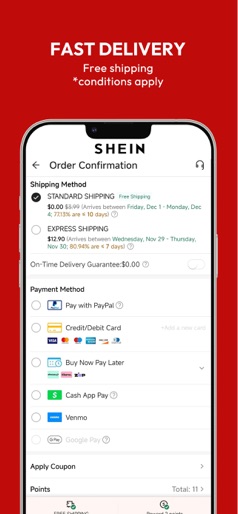
Design Analysis
Visual Design
Style: Custom
Key Features Shown
- •Visual Search (Camera Icon)
- •Local Warehouse shipping
- •Flash Sales (90% off)
- •Category-based navigation
- •New User incentives (30% off)
App Insights
Target: Budget-conscious Gen Z and Millennial consumers looking for trendy fast-fashion and lifestyle products at ultra-low price points.
- •Physical product sales
- •Shipping fees
- •Expedited shipping premiums
- •Third-party seller commissions
ASO Keywords:
About SHEIN-Shopping Online
Everything you love, now at your fingertips! SHEIN is a fun and ultra-affordable online shopping platform. From fashion apparel to home, beauty, accessories, shoes and pets, plus electronics, tools, office and more, SHEIN is dedicated to meeting all your needs in life. We'll keep you in the loop with push notifications about new drops and more. You can also engage with other SHEIN lovers in real time. With free shippings and free returns policy, hope you have a pleasant journey with SHEIN! Inspire yourself with SHEIN right now! Save more - Get an extra 30% off on your first order - Free shipping & free returns (*conditions apply) - Daily Flash Sales: Score up to 90% off for countless items Wide selections - Fun, easy shopping with wide selections - Browse by New Arrivals, Trends, Category, Best Sellers and more Considerate services - Get first access to sale alerts and promotional discounts - Now accepting PayPal and major Credit Cards - Style now, pay later! Choose Afterpay to pay in 4 interest-free payments. - 24/7 Customer Service and Live Chat available Contact us: URL: us.shein.com Facebook: www.facebook.com/sheinus/ Instagram: www.instagram.com/shein_us/ Email: dispute@shein.com The app needs the following access permissions when it is running on your device: - Optional permission(s): o Notification: it will allow us to send push notifications to your device. o Camera: the camera function is required when you need to capture photos and videos and upload them to the app. o Photo and video: it will enable you to upload photos and videos from your device to the app. o Location: where the relevant service is available, it enables location based services on your device. (This is not used in Korea.) o Calendar: it enables you to sync the SHEIN LIVE events to your device calendar. o Microphone: when you try to capture videos using Camera function, the app will also need the microphone access permission to capture the voice. ※ Even if you do not grant optional access permissions, you can still use SHEIN service, except for the functions related to those permissions.
Create screenshots like SHEIN-Shopping Online
Use FlyerBanana's free editor to create professional App Store screenshots inspired by SHEIN-Shopping Online's design. 100+ templates, device frames, and one-click export.