

App Store Screenshots (5)

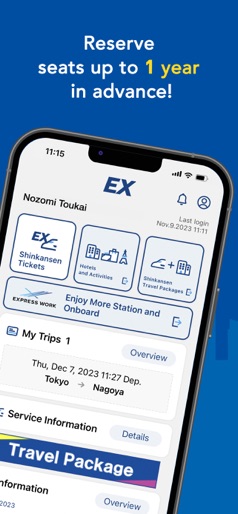


Design Analysis
Visual Design
Style: Hybrid
Key Features Shown
- •Early booking discounts
- •1-year advance reservation
- •Interactive seat map
- •Ticket management/QR display
- •Hotel/Activity bundles
App Insights
Target: International tourists and English-speaking residents in Japan traveling between Tokyo, Osaka, and Fukuoka.
- •Ticket sales
- •Hotel and activity commissions
- •Car rental bookings
ASO Keywords:
About Shinkansen smartEX App
This is an official smartphone app to conveniently use the online reservation services “Smart EX” for Tokaido Sanyo Kyushu Shinkansen. ▼With the EX app, you can: - Reserve Shinkansen seats through the app easily - Discount for early booking - Reserve Shinkansen seats up to 1 year in advance - You can make as many changes as you need, free of charge, before getting on the train - Reserve a set of Shinkansen seats and hotel rooms! - Reserve activities, hotels and car rentals! - Select any seat from the seat map (*reserved seats only) - Information on services available in stations and trains - You can log in quickly by using fingerprint authentication. (only for compatible models) ▼ Main features - Membership registration - Purchase ticket/Reserve seats (time designation, train name designation, easy free seat reservation)) - Confirm reservation - Change and refund reservation (reducing the number of persons) - Display purchase history and receipt - Check, change member information - Display QR-Ticket for boarding - Designate or register IC card for boarding - Service status information (Link) ▼ Notes - Membership registration is required to use this app. For registration, personal information is required, such as member name, date of birth, and a valid credit card, etc. - Ticket purchase (reservation) payment will be taken from the credit card registered on the account. -- You need to register or designate IC card for public transportation (*) to travel ticketless with IC card. (*) Kitaca, PASMO, Suica, manaca, TOICA, PiTaPa, ICOCA, Hayakaken, nimoca, SUGOCA - You need the pickup code to pick up tickets from ticket vending machines, etc., at main stations of Tokaido Sanyo Kyushu Shinkansen, such as Tokyo, Kyoto, Shin-Osaka, Hiroshima, Hakata, Kumamoto etc. - Please do not use this app to make a seat reservation for Japan Rail Pass. - This service is available only in English. - For more details on this service, please see the website. *The email address below is for inquiries about application specifications. Please note that we cannnot answer inquiries about the service.
Create screenshots like Shinkansen smartEX App
Use FlyerBanana's free editor to create professional App Store screenshots inspired by Shinkansen smartEX App's design. 100+ templates, device frames, and one-click export.
More Maps & Navigation Apps
View all

United Airlines
Maps & Navigation


Google Maps
Maps & Navigation


Southwest Airlines: Travel App
Maps & Navigation


The Weather Channel - Radar
Maps & Navigation


Expedia: Hotels, Flights, Cars
Maps & Navigation


Waze Navigation & Live Traffic
Maps & Navigation