
App Store Screenshots (8)




Design Analysis
Visual Design
Style: Custom
Key Features Shown
- •Team Tracking
- •Pomodoro/List View Toggle
- •Goal Setting
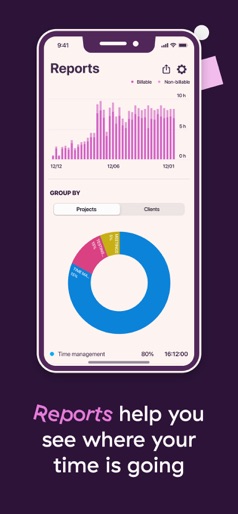
- •Visual Reports (Pie charts/Bar graphs)
- •Calendar Integration
App Insights
Target: Freelancers, consultants, remote teams, and productivity-conscious professionals needing cross-platform time auditing.
- •SaaS Subscription (External)
- •B2B Enterprise Licensing
ASO Keywords:
About Toggl Track: Hours & Time Log
Did you lose track of your time again? We can help. With a single tap, track and save your time with Toggl Track — anywhere you go. Toggl Track has you covered across all of your devices. Start tracking your hours in a browser, then stop it later on your phone or on your Apple Watch. All your tracked time is safely synced between your iPhone, Watch, desktop, and browser. Is the app FREE? Yes, Toggl Track on iOS is completely free for you to use. --- FEATURES: • Reports Discover what's taking up your time and get a snapshot of your day or week with Reports. Analyze your Reports in the app or export them to send the data to your clients (or analyze them further on our web app to see where your hours are going). • Sync Keeps your time seamlessly synced, safely saved, and ready to track on your account, on any device. • Customize your time entries with projects, clients, and tags Organize and add more details to your time entries by adding projects, clients, and tags. See exactly where your work hours are going. • Calendar Instantly create time entries based on your calendar events! Connect your calendar app to Toggl Track to see all of your calendar events and time entries in the app itself. • Pomodoro mode Enjoy better focus and productivity by trying out the Pomodoro technique with our Pomodoro mode. Automatically track your time in 25-minute increments, with notifications, a full screen mode, and countdown timer to really help you stay focused and on task. • Suggestions The more you track, the better the data. The app will give you suggested time entries based on your tracking habits and previous time entries. • Shortcuts Use @ and # to quickly add projects and tags to time entries you track. • Auto-complete Easily find your older time entries and track time on them again. • Manual Mode Want more control? Add and edit all of your tracked time manually and make sure that every second of your time is accounted for. • Siri Toggl Track is compatible with Siri! Track a new time entry, stop it, or access your reports — all that with just a few words. • iOS Widgets Start (and stop) tracking from your iPhone Home Screen. • What if I'm offline? No problem! You can still track your time through the app, and once you're back online, it will sync seamlessly with your account (and the rest of your devices). Your time is not going anywhere. --- Yep, that's Toggl Track — a time tracking app so simple that you'll actually use it and get stuff done! See where your time goes, focus on important tasks, and boost your productivity. Whether you’re in an office or en route to one, stuck on a space mission to Mars, or just want to see how much time you're wasting on projects that aren't bringing you money — track your time anywhere you go.
Create screenshots like Toggl Track: Hours & Time Log
Use FlyerBanana's free editor to create professional App Store screenshots inspired by Toggl Track: Hours & Time Log's design. 100+ templates, device frames, and one-click export.











