
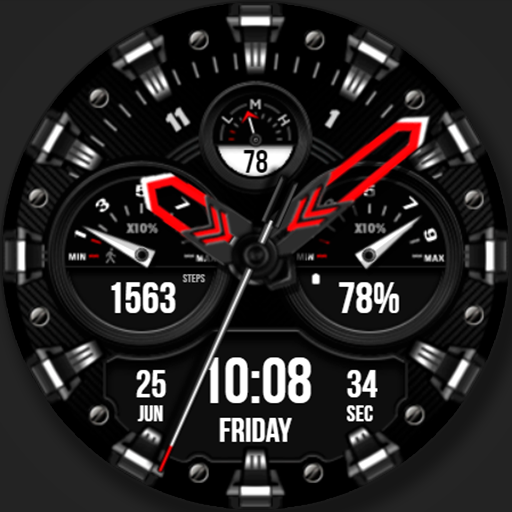
WFP 225 Hybrid watch face
WFProduction by Alexandr Kovalev
Create Screenshots Like WFP 225 Hybrid watch faceApp Store Screenshots (41)


Design Analysis
Visual Design
Style: Custom
Key Features Shown
- •Hybrid Analog-Digital Display
- •Step Counter
- •Battery Indicator
- •Heart Rate Monitor
- •Customizable Color Themes
- •Date and Day Display
App Insights
Target: Wear OS smartwatch owners looking for premium, highly customizable hybrid (analog/digital) aesthetics with a focus on data density.
- •External Storefront Sales
- •Lead Generation for Paid Designs
- •Promotional Bundles (Buy 1 Get 1)
ASO Keywords:
About WFP 225 Hybrid watch face
This watch face supports Wear OS devices. Watch face installation instructions: https://samsung-watchface.com/instructions Watch face settings and recommendations: https://samsung-watchface.com/settings Promotion - Buy 1 - Get 1 free: https://samsung-watchface.com/buy1-get1 FEATURES> - Night mode; - A high resolution; - High optimization; - Low battery consumption; - Multilingual; - 12/24 hour time format; - Changeable colors; - Custom applications and widgets; - Customizable AOD mode. FOLLOW THE NEWS AND PROMOTIONS: WEB: https://samsung-watchface.com TELEGRAM: https://t.me/SamsungWFP FACEBOOK: https://www.facebook.com/groups/wearoswatchfaces INSTAGRAM: https://www.instagram.com/wearos_watchfaces?igsh=ZGhoOXQwMjV4MWEw Sincerely, Alexandr Kovalev.
Create screenshots like WFP 225 Hybrid watch face
Use FlyerBanana's free editor to create professional App Store screenshots inspired by WFP 225 Hybrid watch face's design. 100+ templates, device frames, and one-click export.











