

Xender - Share Music Transfer
Xender File Sharing Team
Create Screenshots Like Xender - Share Music TransferApp Store Screenshots (5)


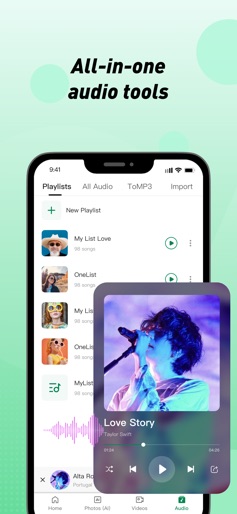
Design Analysis
Visual Design
Style: Custom
Key Features Shown
- •Cross-platform connection (PC, iPhone, Others)
- •Batch file transfer with progress tracking
- •AI-powered photo organization (Face/Text recognition)
- •Integrated video player with gesture controls
- •Audio management with MP3 converter
App Insights
Target: Users in emerging markets with limited data plans and users needing cross-platform file transfers (iOS to Android/PC) without cloud dependency.
- •In-app advertising
- •Data monetization (potential)
- •Cross-promotion of other apps
ASO Keywords:
About Xender - Share Music Transfer
Need to transfer file between phones or between phone and pc? Try Xender and experience the fastest all-in-one file transfer and sharing app! Xender can send anything you want, from documents, photos, to videos, in an instant with a few taps. Besides to transfer and share file between iOS devices, Xender also allows to transfer file between iOS and other devices. Phone to Phone Transfer ● No USB, no internet, no data usage! ● Transfers everything - files, documents, photos, audio, videos! ● Extremely fast - imagine transfer video to friends in seconds! ● Supports cross-platform file transfer and sharing between iOS and other devices. Built-in Music Player Powerful File Manager with a full featured music player. Enjoy songs within the App. Phone to Computer Transfer ● Connects your phone to computer - even other people’s, anywhere! ● Transfers everything - files, documents, photos, videos! ● Supports off-line mode with high transfer speed and no internet is needed! Send anywhere as you want. Transfer music from iPhone to iPhone Transfer videos from iPhone to other phones Transfer photos from iPhone to Laptop PC Transfer pictures from other phones to Laptop PC Transfer MP3 from iPhone to Desktop PC Transfer MP4 from other phones to Desktop PC Transfer songs from iPhone to MacBook Transfer files from other phones to MacBook Supported Languages English, Amharic, Arabic, Bengali, Bulgarian, Burmese, Czech, Dutch, Filipino, French, German, Greek, Gujarati, Hausa, Hindi, Hungarian, Igbo, Indonesian, Italian, Japanese, Korean, Malay, Malayalam, Marathi, Oromo, Pashto, Persian, Polish, Portuguese, Punjabi, Romanian, Sindhi, Spanish, Swahili, Swedish, Thai, Traditional Chinese, Turkish, Ukrainian, Urdu, Vietnamese, Yoruba Stay Connected Facebook: https://facebook.com/XenderApp Support service@xender.com
Create screenshots like Xender - Share Music Transfer
Use FlyerBanana's free editor to create professional App Store screenshots inspired by Xender - Share Music Transfer's design. 100+ templates, device frames, and one-click export.
More File Management Apps
View all

Dumpster: Photo/Video Recovery
File Management


ShareKaro Lite: File Share App
File Management


SHAREit: Transfer, Share Files
File Management

Amerigo File Manager
File Management


Zapya - File Transfer, Share
File Management

All Recovery - Photos, Videos
File Management