

App Store Screenshots (7)



Design Analysis
Visual Design
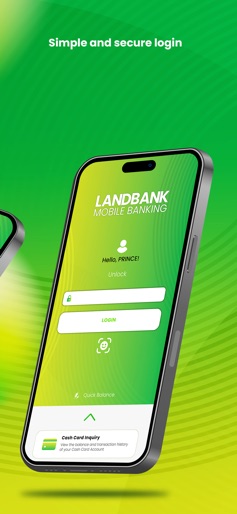
Style: iOS Native
Key Features Shown
- •Biometric Login
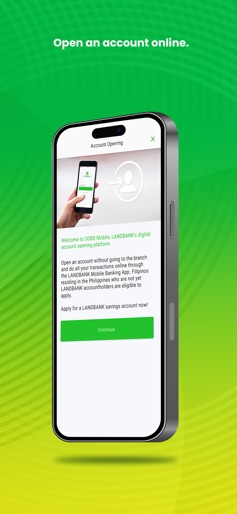
- •Digital Account Opening
- •Multi-account Dashboard
- •QR Code Generation
- •Loan Tracking
App Insights
Target: Filipino citizens, government employees, farmers, and Overseas Filipino Workers (OFWs) requiring government-backed banking services.
- •Transaction fees (InstaPay/PESONet)
- •Service fees (Checkbook requests, card replacements)
- •Interest income from deposits
- •Commission on Retail Treasury Bonds (RTBs)
ASO Keywords:
About LANDBANK Mobile Banking
Bank conveniently with the LANDBANK Mobile Banking App. Open an account, manage finances, transfer funds, pay bills securely, and more, with just a few taps. FEATURES • Account Opening: Open an account online without visiting a branch. • Fund Transfers: Transfer funds to other LANDBANK accounts, or to other banks via InstaPay and PESONet. Use QR codes for faster and more accurate transfers. • Bills Payment: Easily pay bills to 100+ billers • Pay via QR: Make payments to select merchants by simply scanning a QR code with your smartphone. • Cardless Withdrawal: Initiate cash withdrawal from any LANDBANK ATM without your card. • Investment Opportunities: Purchase Retail Treasury Bonds (RTBs) to diversify your investments. • Account Registration: Use your deposit account with an ATM card, prepaid card, or credit card to sign up. • Account Management: View balances, monitor transactions, and check statements for your accounts, prepaid cards, cash cards, credit cards, salary loans, and investments. • Secure Authentication: Use the One-Time PIN (OTP) Generator for instant and secure OTP authentication. • Card Security: Protect your debit and credit cards with Mobilock. • Foreign Exchange Updates: Get access to foreign exchange rates daily. • Investment Funds Monitor: Check the latest prices of your Unit Investment Trust Fund daily. • Checkbook Requests: Conveniently request for a new checkbook. • Self-Service Options: Unlock your user ID and reset password. • Branch Locator: Find the LANDBANK branch, ATM, and Cash Deposit Machine nearest you. SECURITY FEATURES • Email Confirmation: Receive an email for every successful financial transaction. • One-Time PIN Authentication: Ensure security for sensitive transactions with OTP verification. • Device Registration: Register the smartphones or tablets you regularly use to log in and get your OTP authorization via SMS. • End-to-End Encryption: Protect your data with an SSL certificate that guarantees secure communication. ABOUT LANDBANK LANDBANK is the largest development financial institution in the Philippines promoting financial inclusion, digital transformation and sustainable development to benefit Filipinos. The Bank is present in all 82 provinces in the country, committed to providing accessible and affordable financial support to key players of the economy and industries as part of its broader thrust of serving the nation. For more information, visit https://www.landbank.com.
Create screenshots like LANDBANK Mobile Banking
Use FlyerBanana's free editor to create professional App Store screenshots inspired by LANDBANK Mobile Banking's design. 100+ templates, device frames, and one-click export.
More Banking Apps
View all

Branch: Instant Loan & Banking
Banking


Chime – Mobile Banking
Banking


Credit Sesame: Grow Your Score
Banking

SoFi: Bank, Invest & Crypto
Banking


MoneyLion: Banking & Cash Back
Banking


ZET-FD Card, Credit Score, UPI
Banking